
Wavelength frame multiplication#
Wavelength frame multiplication (WFM) is a technique commonly used at long-pulse facilities to improve the resolution of the results measured at the neutron detectors. See for example the article by Schmakat et al. (2020) for a description of how WFM works.
In this notebook, we show how to use essreduce’s unwrap module to compute an accurate wavelength coordinate for neutrons travelling through a WFM beamline.
[1]:
import numpy as np
import plopp as pp
import scipp as sc
import scippnexus as snx
from scippneutron.chopper import DiskChopper
from ess.reduce.nexus.types import RawDetector, SampleRun, NeXusDetectorName, Position
from ess.reduce.unwrap import *
Setting up the beamline#
Creating the beamline choppers#
We begin by defining the chopper settings for our beamline. In principle, the chopper setting could simply be read from a NeXus file.
For this example, we create choppers modeled on the V20 ESS beamline at HZB. It consists of 5 choppers:
2 WFM choppers
2 frame-overlap choppers
1 pulse-overlap chopper
The first 4 choppers have 6 openings (also known as cutouts), while the last one only has a single opening.
[2]:
wfm1 = DiskChopper(
    frequency=sc.scalar(-70.0, unit="Hz"),
    beam_position=sc.scalar(0.0, unit="deg"),
    phase=sc.scalar(-47.10, unit="deg"),
    axle_position=sc.vector(value=[0, 0, 6.6], unit="m"),
    slit_begin=sc.array(
        dims=["cutout"],
        values=np.array([83.71, 140.49, 193.26, 242.32, 287.91, 330.3]) + 15.0,
        unit="deg",
    ),
    slit_end=sc.array(
        dims=["cutout"],
        values=np.array([94.7, 155.79, 212.56, 265.33, 314.37, 360.0]) + 15.0,
        unit="deg",
    ),
    slit_height=sc.scalar(10.0, unit="cm"),
    radius=sc.scalar(30.0, unit="cm"),
)

wfm2 = DiskChopper(
    frequency=sc.scalar(-70.0, unit="Hz"),
    beam_position=sc.scalar(0.0, unit="deg"),
    phase=sc.scalar(-76.76, unit="deg"),
    axle_position=sc.vector(value=[0, 0, 7.1], unit="m"),
    slit_begin=sc.array(
        dims=["cutout"],
        values=np.array([65.04, 126.1, 182.88, 235.67, 284.73, 330.32]) + 15.0,
        unit="deg",
    ),
    slit_end=sc.array(
        dims=["cutout"],
        values=np.array([76.03, 141.4, 202.18, 254.97, 307.74, 360.0]) + 15.0,
        unit="deg",
    ),
    slit_height=sc.scalar(10.0, unit="cm"),
    radius=sc.scalar(30.0, unit="cm"),
)

foc1 = DiskChopper(
    frequency=sc.scalar(-56.0, unit="Hz"),
    beam_position=sc.scalar(0.0, unit="deg"),
    phase=sc.scalar(-62.40, unit="deg"),
    axle_position=sc.vector(value=[0, 0, 8.8], unit="m"),
    slit_begin=sc.array(
        dims=["cutout"],
        values=np.array([74.6, 139.6, 194.3, 245.3, 294.8, 347.2]),
        unit="deg",
    ),
    slit_end=sc.array(
        dims=["cutout"],
        values=np.array([95.2, 162.8, 216.1, 263.1, 310.5, 371.6]),
        unit="deg",
    ),
    slit_height=sc.scalar(10.0, unit="cm"),
    radius=sc.scalar(30.0, unit="cm"),
)

foc2 = DiskChopper(
    frequency=sc.scalar(-28.0, unit="Hz"),
    beam_position=sc.scalar(0.0, unit="deg"),
    phase=sc.scalar(-12.27, unit="deg"),
    axle_position=sc.vector(value=[0, 0, 15.9], unit="m"),
    slit_begin=sc.array(
        dims=["cutout"],
        values=np.array([98.0, 154.0, 206.8, 255.0, 299.0, 344.65]),
        unit="deg",
    ),
    slit_end=sc.array(
        dims=["cutout"],
        values=np.array([134.6, 190.06, 237.01, 280.88, 323.56, 373.76]),
        unit="deg",
    ),
    slit_height=sc.scalar(10.0, unit="cm"),
    radius=sc.scalar(30.0, unit="cm"),
)

pol = DiskChopper(
    frequency=sc.scalar(-14.0, unit="Hz"),
    beam_position=sc.scalar(0.0, unit="deg"),
    phase=sc.scalar(0.0, unit="deg"),
    axle_position=sc.vector(value=[0, 0, 17.0], unit="m"),
    slit_begin=sc.array(
        dims=["cutout"],
        values=np.array([40.0]),
        unit="deg",
    ),
    slit_end=sc.array(
        dims=["cutout"],
        values=np.array([240.0]),
        unit="deg",
    ),
    slit_height=sc.scalar(10.0, unit="cm"),
    radius=sc.scalar(30.0, unit="cm"),
)

disk_choppers = {"wfm1": wfm1, "wfm2": wfm2, "foc1": foc1, "foc2": foc2, "pol": pol}
It is possible to visualize the properties of the choppers by inspecting their repr:
[3]:
wfm1
[3]:
- axle_positionscippVariable()vector3m[0. 0. 6.6]
- frequencyscippVariable()float64Hz-70.0
- beam_positionscippVariable()float64deg0.0
- phasescippVariable()float64deg-47.1
- slit_beginscippVariable(cutout: 6)float64deg98.71, 155.490, ..., 302.910, 345.3
- slit_endscippVariable(cutout: 6)float64deg109.7, 170.790, ..., 329.370, 375.0
- slit_heightscippVariable(cutout: 6)float64cm10.0, 10.0, ..., 10.0, 10.0
- radiusscippVariable()float64cm30.0
Define the source position which is required to compute the distance that neutrons travelled. In this example, chopper positions are given relative to the source, so we set the source position to the origin.
[4]:
source_position = sc.vector([0, 0, 0], unit="m")
Adding a detector#
We also have a detector, which we place 26 meters away from the source.
[5]:
Ltotal = sc.scalar(26.0, unit="m")
Creating some neutron events#
We create a semi-realistic set of neutron events based on the ESS pulse.
[6]:
from ess.reduce.unwrap.fakes import FakeBeamline

ess_beamline = FakeBeamline(
    choppers=disk_choppers,
    source_position=source_position,
    monitors={"detector": Ltotal},
    run_length=sc.scalar(1 / 14, unit="s") * 14,
    events_per_pulse=200_000,
)
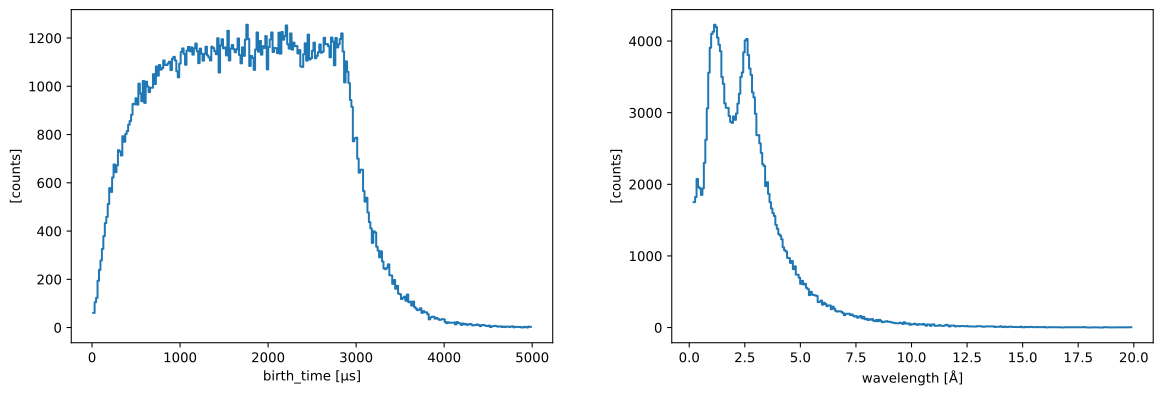
The initial birth times and wavelengths of the generated neutrons can be visualized (for a single pulse):
[7]:
one_pulse = ess_beamline.source.data["pulse", 0]
one_pulse.hist(birth_time=300).plot() + one_pulse.hist(wavelength=300).plot()
[7]:
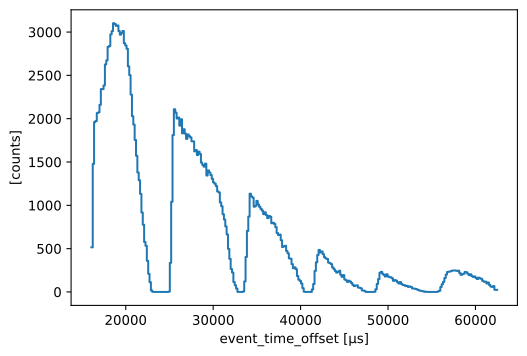
From this fake beamline, we extract the raw neutron signal at our detector:
[8]:
raw_data = ess_beamline.get_monitor("detector")[0]

# Visualize
raw_data.hist(event_time_offset=300).squeeze().plot()
[8]:
The total number of neutrons in our sample data that make it through to the detector is:
[9]:
raw_data.sum().value
[9]:
np.float64(190718.0)
Computing neutron wavelengths#
Next, we use a workflow that provides an estimate of the neutron wavelength as a function of neutron time-of-arrival.
Setting up the workflow#
[10]:
wf = GenericUnwrapWorkflow(run_types=[SampleRun], monitor_types=[])

wf[RawDetector[SampleRun]] = raw_data
wf[DetectorLtotal[SampleRun]] = Ltotal
wf[NeXusDetectorName] = "detector"

wf.visualize(WavelengthDetector[SampleRun])
[10]:
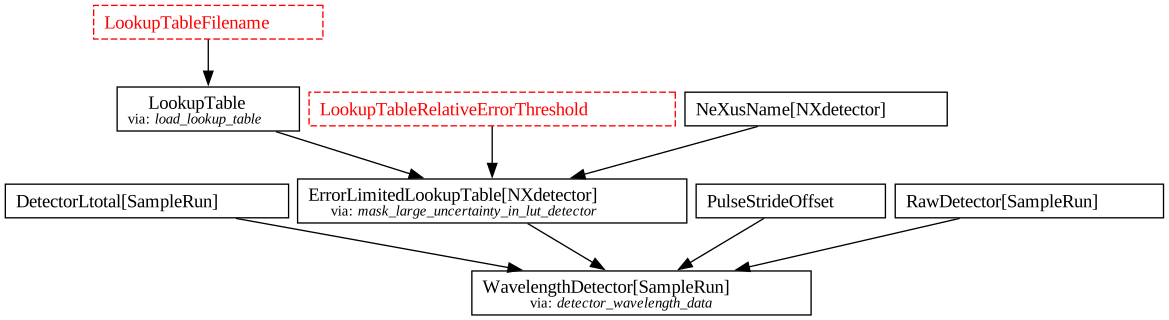
By default, the workflow tries to load a LookupTable from a file.
In this notebook, instead of using such a pre-made file, we will build our own lookup table from the chopper information and apply it to the workflow.
Building the wavelength lookup table#
We use the Tof package to propagate a pulse of neutrons through the chopper system to the detectors, and predict the most likely neutron wavelength for a given time-of-arrival and distance from source.
From this, we build a lookup table on which bilinear interpolation is used to compute a wavelength for every neutron event.
[11]:
lut_wf = LookupTableWorkflow(run_types=[SampleRun])
lut_wf[DiskChoppers[SampleRun]] = disk_choppers
lut_wf[Position[snx.NXsource, SampleRun]] = source_position
lut_wf[LtotalRange[SampleRun, snx.NXdetector]] = (
    sc.scalar(5, unit='m'),
    sc.scalar(35, unit='m'),
)
lut_wf.visualize(LookupTable[SampleRun, snx.NXdetector])
[11]:

Inspecting the lookup table#
The workflow first runs a simulation using the chopper parameters above, and the result is stored in SimulationResults (see graph above).
From these simulated neutrons, we create a figure displaying the neutron wavelengths, as a function of arrival time at the detector.
This is the basis for creating our lookup table.
[12]:
sim = lut_wf.compute(SimulationResults[SampleRun])


def to_event_time_offset(sim):
    # Compute event_time_offset at the detector
    eto = (
        sim.time_of_arrival + ((Ltotal - sim.distance) / sim.speed).to(unit="us")
    ) % sc.scalar(1e6 / 14.0, unit="us")
    # Compute time-of-flight at the detector
    tof = (Ltotal / sim.speed).to(unit="us")
    return sc.DataArray(
        data=sim.weight,
        coords={"wavelength": sim.wavelength, "event_time_offset": eto, "tof": tof},
    )


events = to_event_time_offset(sim.readings["pol"])
fig = events.hist(wavelength=300, event_time_offset=300).plot(norm="log")
fig
[12]:
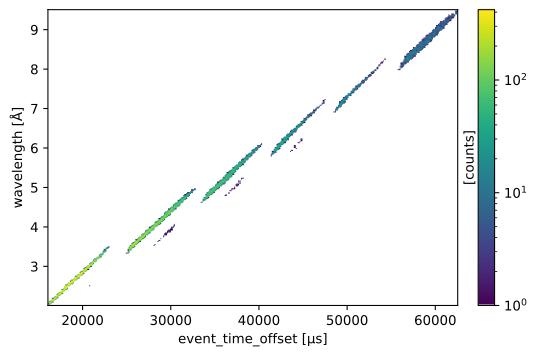
The lookup table is then obtained by computing the weighted mean of wavelength inside each time-of-arrival bin.
This is illustrated by the orange line in the figure below:
[13]:
table = lut_wf.compute(LookupTable[SampleRun, snx.NXdetector])

# Overlay mean on the figure above
table.array["distance", 212].plot(ax=fig.ax, color="C1", ls="-", marker=None)

# Zoom in
fig.canvas.xrange = 40000, 50000
fig.canvas.yrange = 5.5, 7.5
fig
[13]:
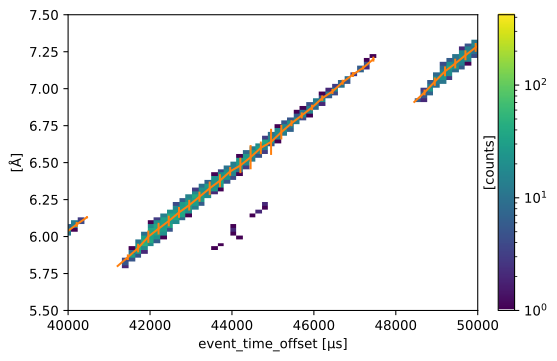
We can see that the orange lines follow the center of the colored areas.
We can also see that in regions where there is contamination from other chopper openings (overlapping regions in time), the error bars on the orange line get larger.
Another way of looking at this is to plot the entire table, showing the predicted wavelength as a function of event_time_offset and distance. We also show alongside it the standard deviation of the predicted wavelength.
[14]:
def plot_lut(table):
    fig = table.plot(title="Predicted time-of-flight") + sc.stddevs(table.array).plot(
        title="Standard deviation", vmax=0.5
    )
    for f in (fig[0, 0], fig[0, 1]):
        f.ax.axhline(Ltotal.value, ls='dashed', color='k')
        f.ax.text(1e3, Ltotal.value, "detector", va='bottom', color='k')
        f.ax.text(1e3, Ltotal.value, "at 26m", va='top', color='k')
    return fig


plot_lut(table)
[14]:
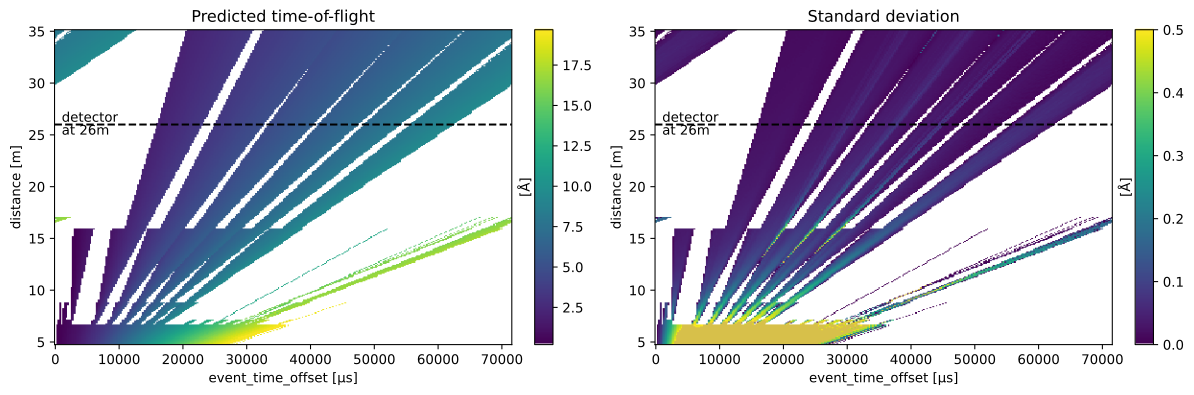
We can see that at low distances (< 7m), before the first choppers, the uncertainties are very large. Neutrons with different wavelengths, originating from different parts of the pulse, are mixing and make it very difficult to predict a good wavelength.
As we move to larger distances, uncertainties drop overall (colors drift to blue). However, we still see spikes of uncertainties inside the frames around 26 m where the detector is placed, which indicates contamination from neighbouring chopper openings.
Optionally masking out large uncertainties#
It is actually possible to mask out regions of large uncertainty using the LookupTableRelativeErrorThreshold parameter.
Because we may want to use different uncertainty criteria for different experimental runs as well as different components in the beamline (monitors, multiple detector banks), the masking is not hard-coded in the table but a parameter that is applied on-the-fly in the original workflow which computes wavelength.
We thus first update that workflow by setting the newly computed table as the LookupTable parameter. Next, we apply a threshold for the detector component and inspect the masked table:
[15]:
wf[LookupTable[SampleRun, snx.NXdetector]] = table
wf[LookupTableRelativeErrorThreshold] = {"detector": 0.01}

masked = wf.compute(ErrorLimitedLookupTable[SampleRun, snx.NXdetector])

plot_lut(masked)
[15]:
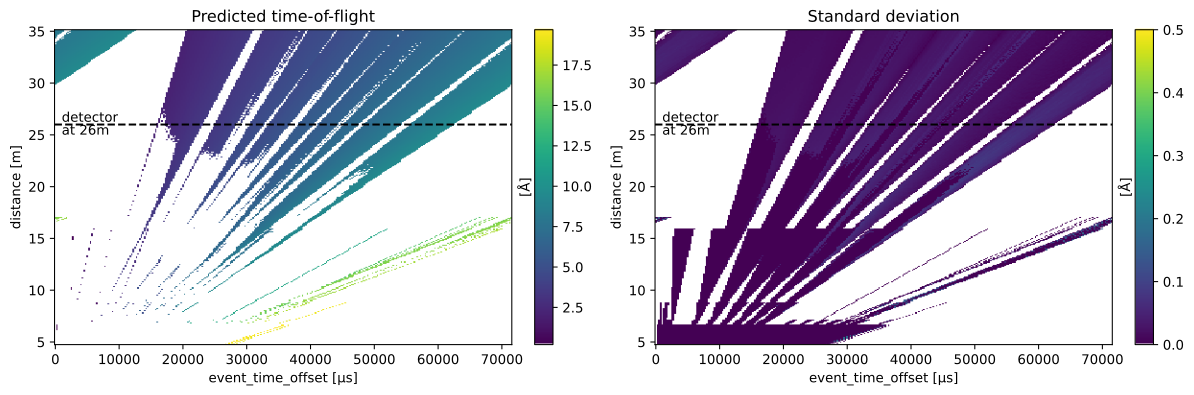
As we can see in the left panel, the regions in the table with large uncertainties are now white (they have been assigned a NaN value). However, the masking is not very smooth, and it would also mean that a large number of events in these white regions would be discarded in the final reduced result.
The contamination from neighbouring chopper openings is actually relatively small, and we instead decide to live with that uncertainty and set the threshold to infinity to remove any masking in the table.
[16]:
wf[LookupTableRelativeErrorThreshold] = {"detector": np.inf}
Computing a wavelength coordinate#
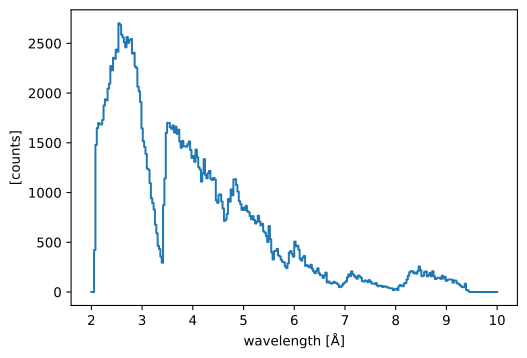
We will now compute our event data with a wavelength coordinate, and histogram the results:
[17]:
wavs = wf.compute(WavelengthDetector[SampleRun])

bins = sc.linspace("wavelength", 2, 10, 301, unit="angstrom")
histogrammed = wavs.hist(wavelength=bins).squeeze()
histogrammed.plot()
[17]:
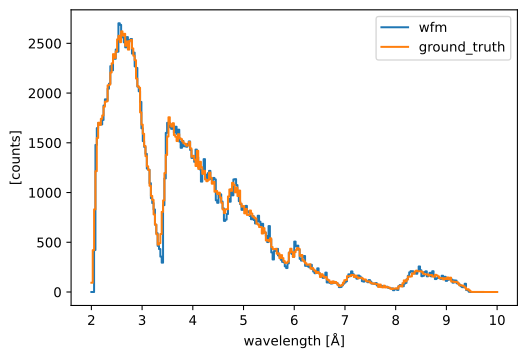
Comparing to the ground truth#
As a consistency check, because we actually know the wavelengths of the neutrons we created, we can compare the true neutron wavelengths to those we computed above.
[18]:
ground_truth = ess_beamline.model_result["detector"].data.flatten(to="event")
ground_truth = ground_truth[~ground_truth.masks["blocked_by_others"]]

pp.plot(
    {
        "wfm": histogrammed,
        "ground_truth": ground_truth.hist(wavelength=bins),
    }
)
[18]: